


eHub
4.26.92K Reviews
App Specs
- Version
- 4.65.0
- Updated On
- License
- Free
- Downloads
- 1,000,000+
- Developer
- TEAM Software
- Categories
- Business
- Platform
- Android, iOS
Screenshots
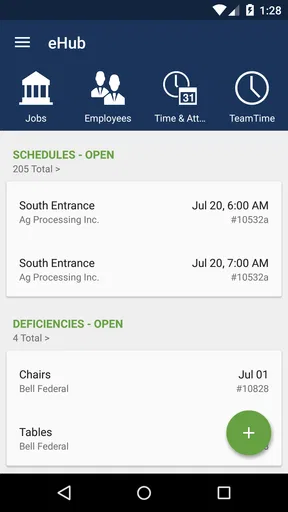
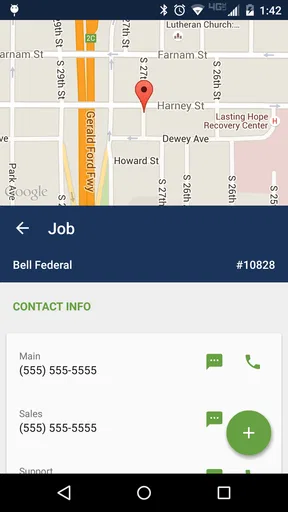
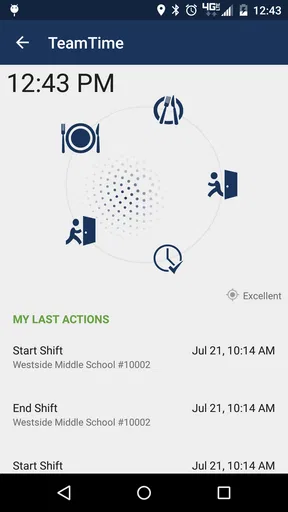
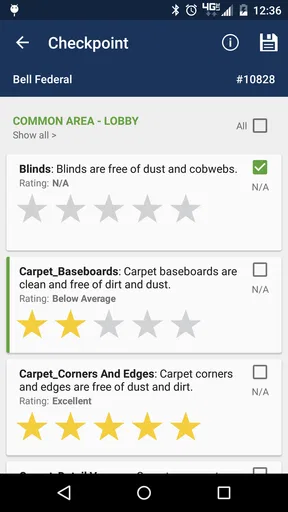
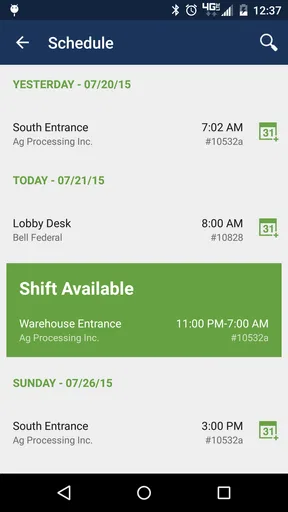
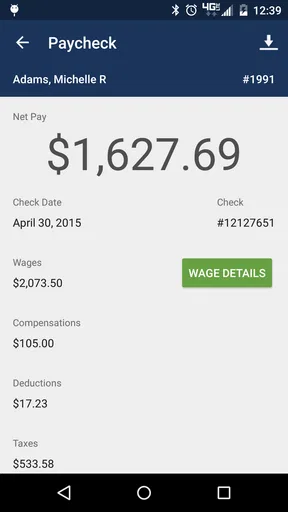
 Analysis by AppCompare
For employees working in building services and security contracting, the difficult part of a workday is often not the job itself but the small administrative tasks around it. Checking a schedule, confirming a shift, finding a customer-service update, or handling a routine request can become awkward when the only alternative is a phone call or a desktop portal. eHub is designed for that gap: it is a business self-service app from TEAM Software for employees and customers connected with building service companies and security contractors.
I see its value less as an all-purpose business tool and more as a focused companion for people whose work is organized through a participating employer or contractor. That distinction matters. You do not install it expecting a general calendar, a team chat platform, or a replacement for a full workforce-management system. Its usefulness depends on the organization behind your account and on the tasks that organization makes available through the app.
The app is free, is rated for Everyone, and has been available since October 24, 2011. Its current version is 4.65.0 and it requires at least iOS or Android version 12, depending on the device platform. With more than a million installs, an average rating of 4.2 from around twenty thousand ratings, and roughly 6.9 thousand written reviews, it is clearly used beyond a small pilot group. Those figures do not make it perfect, but they do suggest that eHub has become a familiar mobile access point for a substantial workforce.
How eHub feels during a normal workday
I find eHub most useful when it turns a small workday question into something I can check for myself, instead of interrupting a colleague or waiting until I reach a computer. The key is to treat it as a quick access point for tasks your organization supports, not as a substitute for every workplace conversation. That distinction helps explain what the app can—and cannot—make easier.
Speed expectations before you rely on it
My expectation with an app like this is not instant entertainment-style responsiveness. A self-service tool has to connect your phone to information managed by an employer or contractor, so the useful question is whether it gets me to the right work information without unnecessary steps. In that role, eHub makes the most sense when I open it for one clear task and close it again, rather than treating it as an app I keep running all day.
That focused approach also helps with perceived speed. If I am checking something before leaving home, I want a short path from sign-in to the relevant employee or customer area. If I am standing outside a site between duties, I do not want to navigate through unrelated business features. The app’s strongest performance case is therefore the quick administrative check: open it, locate the available self-service option, confirm the detail, and get back to work.
I would not judge it by the standards of a locally stored notes app. Information connected to a company account may take longer to appear than a simple document saved on the phone, especially when the task depends on a live organizational system. That is not automatically a flaw, but it changes how I use it. I prefer to check important details before I am already under time pressure, particularly when I am moving between locations or working in an area with an uncertain connection.
Worth Reading Before You Choose

EA SPORTS FC Mobile 26 Is a Bigger Football Game, but It Takes Time

Flipboard Shows What News Apps Must Do Beyond the Feed

Switching to Android Auto Means Rethinking Your Driving Routine

Google Calendar Makes a Crowded Week Easier to Manage

Ludo King Makes the Most of the Minutes Between Plans

Baby Panda World Brings Quick Play to Modern Phones, but Its Game Library Feels Busy
A practical habit is to open eHub once when I have a stable connection and identify where the functions I use most often are located. That small preparation reduces the feeling that the app is slow when the real issue is searching through an unfamiliar account area. It also makes a difference for workers who use the app only occasionally and may otherwise have to remember the route each time.
What happens during heavier use
The more demanding moments are likely to come from the work around the app rather than from constant mobile activity. A busy employee may need to check several pieces of information in succession, switch between personal work needs and customer-related tasks, or repeat the same process during a shift change. A supervisor or contractor contact may also expect many people to use the system at once. Those are the situations in which a self-service app earns its place, but they are also the situations where a small delay or unclear screen becomes more noticeable.
I find the best workflow is to separate urgent confirmation from later administration. If I need to know something before travelling to a site, I would check it early and keep the result in mind rather than waiting until I am at the entrance. For a non-urgent request, I would submit or review it when I have a few uninterrupted minutes. This is not glamorous advice, but it prevents the app from becoming the last link in a rushed chain of decisions.
Another useful trade-off is the difference between employee and customer use. An employee may return frequently for work-related self-service, while a customer may open the app only when a service question needs attention. The same interface cannot feel equally natural to both groups. If I were using it as a customer, I would value a direct path to the relevant account or service area; if I were using it as an employee, I would care more about repeat access and whether routine tasks are easier than contacting an office.
eHub is not the right choice for replacing every communication channel. A phone call remains better when an issue is urgent, sensitive, or outside the options exposed through the account. Likewise, a desktop browser can be more comfortable for reviewing a large amount of information or completing a task that requires careful typing. The app’s advantage is convenience for supported self-service, not universal coverage.
Reliability and recovering from interruptions
Reliability here has two parts. First, the app must open and behave consistently on the phone. Second, the information and actions it presents must reflect the connected organization accurately. The first part is something I can judge as a mobile user; the second depends heavily on how the employer or contractor maintains its systems. That is why I would avoid treating any self-service app as the sole authority for a time-critical matter without checking the established workplace process.
For everyday use, I would make recovery part of the routine. If the app is interrupted while I am moving between screens, I would reopen it and confirm whether the last action actually completed instead of assuming it did. If a request or update matters, I would look for a visible confirmation within the account or use the organization’s normal contact route when the result is unclear. This protects against the most frustrating kind of failure: repeating an action that already succeeded or believing something was submitted when it was not.
That recovery habit is especially important for people using the app during a shift. A phone may lock, a call may arrive, or a worker may need to put the device away immediately. A mobile tool should fit those interruptions, but I still prefer to verify the outcome of any meaningful action. eHub is most dependable in my hands when I use it as a controlled checkpoint rather than as a background process I assume will manage everything automatically.
The public response is encouraging without being a guarantee. A 4.2 average and a large base of ratings indicate that many people find the app useful, while the existence of thousands of written reviews also shows that experiences are not identical. I read that as a reason to keep expectations practical: the app is established enough to be worth trying when my organization supports it, but my employer’s configuration and the quality of its underlying information remain important parts of the experience.
Device limits and resource expectations
The minimum operating-system requirement is version 12, which is a meaningful consideration for anyone using an older phone. Before planning to depend on eHub, I would check the device’s operating-system version and available store compatibility. A free app is not much help if the phone cannot install the current release or if the user is delaying system updates for storage, battery, or workplace reasons.
I would also keep the phone in reasonable condition before a workday: enough battery for the shift, enough free storage for normal updates, and a connection suitable for account access. I cannot promise that those steps will solve every problem, but they remove common device-side obstacles. For a worker who uses a basic or aging phone mainly for calls, messages, and work access, the operating-system requirement may be more important than the app’s price.
Resource demands are best considered in context. eHub is a business utility, not something I would expect to consume my attention continuously. Its sensible role is occasional access to work or customer self-service, so I would not keep it open unnecessarily. Closing it after completing a task also makes the workflow clearer and reduces the chance that I return to an outdated screen later.
Privacy and account boundaries deserve practical attention even without turning the app into a technical checklist. Because it connects employees or customers with organizational information, I would use my own phone account carefully, avoid handing an unlocked device to someone else, and sign out or lock the phone according to my workplace’s normal practice. The app is rated for Everyone, but that age label does not mean every account action is appropriate to share casually; the account relationship still matters.
Where it beats the usual alternatives
The usual alternative for an employee is often a call, a message to a supervisor, an email, or a desktop portal. Those channels remain useful, but each adds friction in a different way. A call requires another person to be available. Email creates a waiting period and may scatter the answer across a long thread. A desktop portal is powerful when I am at a computer but inconvenient when I am already away from one.
eHub’s advantage is the middle ground. When my organization has made the relevant service available, I can begin with a phone instead of interrupting someone else. That makes it particularly suitable for workers who are mobile, work across sites, or have short gaps between duties. It also gives customers a more direct self-service route than relying on a contractor’s office for every routine interaction.
The trade-off is that a general productivity app is usually more flexible. A calendar, notes tool, messaging service, or broad employee platform may handle planning and communication better. I would choose those alternatives when I need collaboration, detailed document work, or a complete overview of many unrelated tasks. I would choose eHub when the task is specifically tied to the employee or customer relationship managed through the participating business.
Three practical ways to get more from it
First, I would treat the app as a pre-shift preparation tool rather than waiting for a problem to appear. Checking relevant information before travelling gives me time to use another contact method if something is unclear. This is a small workflow improvement, but it turns a mobile self-service app from an emergency dependency into a routine part of preparation.
Second, I would separate “information I need to read” from “action I need to complete.” When I am only confirming a detail, I can work quickly and avoid unnecessary navigation. When I am submitting a request or changing something available through the account, I would slow down, review the final screen, and verify completion. That distinction reduces accidental repeats and is more useful than simply trying to move through every screen faster.
Third, I would learn the recovery route before I need it. I would know which workplace contact to use if the app does not show the expected information, if an action appears incomplete, or if an urgent issue falls outside self-service. This is the hidden strength of a good mobile workflow: the app does not have to solve every problem if it makes routine problems easier and leaves a clear way to handle exceptions.
Who should use it, and who should skip it?
I would recommend trying eHub to employees of building service companies and security contractors whose organizations use TEAM Software systems for supported self-service. It is also worth considering for customers who want a mobile route to the services their contractor has made available. The free price removes one obvious barrier, and the Everyone rating makes it broadly accessible from an age-label perspective.
I would be more cautious if I were looking for a universal business organizer. The app is not where I would manage an unrelated freelance business, build a project plan, coordinate a team chat, or replace a full desktop administration system. Someone whose employer does not use the relevant TEAM Software setup may also find that the app does not address their needs. In that situation, the better option is the channel officially supported by the organization, even if it is less convenient.
It is also not ideal for someone who needs a large-screen workspace. A phone is excellent for a quick check while moving between locations, but a desktop browser or office system can be easier for extended review and careful data entry. My recommendation is therefore conditional but clear: use eHub for the mobile self-service moments it is built to support, and keep the usual workplace channel available for exceptions and larger tasks.
My performance verdict
After looking at eHub as a daily work utility rather than a conventional consumer app, I think its performance case is straightforward. It should be judged by how quickly it helps an employee or customer reach supported information, how calmly it handles short mobile sessions, and how easy it is to recover when a task is interrupted. It is not a tool I would install simply because it is popular; I would install it because my organization’s work relationship makes it relevant.
The age of the product and its current version suggest an app that has had time to remain part of an established business workflow. Its broad install base and solid average rating reinforce that impression, while the mixed nature of user experiences is a reminder that account setup and employer processes matter. I would keep the app updated, use it on a compatible device, and avoid postponing important checks until the last possible moment.
My honest conclusion is that eHub is most valuable when it replaces a small but repeated inconvenience: the call, email, or trip to a computer needed for a routine employee or customer task. It will not make every workplace process faster, and it cannot compensate for unclear organizational information. However, when the right services are connected to the account, its real strength is dependable access to work-related self-service at the moment a phone is more practical than an office system. For that specific audience, I would recommend giving it a place on the phone; for everyone else, I would choose a more general business app or the organization’s official alternative instead.
Pros
- Centralizes multiple services and resources in one convenient app.
- Clean interface makes browsing and finding features straightforward.
- Useful for keeping important account information accessible on the go.
- Can reduce the need to switch between separate websites or platforms.
- Practical for users who regularly access eHub-supported services.
Cons
- Some features may depend on your organization’s eHub configuration.
- Login or account issues may require contacting an administrator.
- Performance can vary with connection quality and server availability.
- The app may offer limited value to users without an eHub account.
- Notifications and updates may not always arrive instantly.
FAQs for eHub
What is eHub and what can I use it for?
eHub is a digital platform designed to bring selected services, information, and account-related tools together in one place. Depending on the version and organization providing it, users may be able to view updates, manage requests, access documents, communicate with support, or check personal information. Available features can vary, so it is worth reviewing the app description and permissions before downloading.
Is eHub free to download and use?
The eHub application may be free to download, but some services available through it can depend on your employer, organization, subscription, or account type. In my review, the basic installation did not necessarily indicate that every feature was included without restrictions. Check the official store listing and your organization’s instructions for possible charges, eligibility requirements, or premium services before relying on the app.
What information or permissions does eHub require?
eHub may request permissions needed for account access, notifications, document handling, camera use, or other features offered by the specific provider. The exact permissions can differ between Android and iOS versions and may change after updates. Before accepting access, review the privacy policy and system prompts carefully. Only grant permissions that make sense for the functions you plan to use.
Can I use eHub without an account or invitation?
In many cases, eHub is intended for users connected to a particular company, institution, service provider, or membership program. You may need an existing account, invitation, employee number, customer ID, or activation code to sign in. If registration fails, downloading the app alone may not be enough. Contact the organization associated with eHub to confirm eligibility and obtain the correct login details.
Is eHub safe and reliable for storing or accessing personal information?
eHub can be useful for accessing private account information, but safety depends on the official developer, your login practices, device security, and how the provider handles data. Download it only from an official app store, verify the developer name, keep the app updated, and avoid sharing passwords or verification codes. Also review privacy details and sign out on shared devices.


